

A multi-account banking strategy is the practice of spreading your money across two or more purpose-labeled bank accounts so each dollar has a designated job before you spend it. The simplest way to start: open a checking account for bills and daily spending, a high-yield savings account for your emergency fund, and a second savings account for a specific short-term goal. Then set up a split direct deposit or a recurring transfer on payday so money moves automatically. The whole setup takes 30 minutes or less, and the automation does the heavy lifting from there.
Table of Contents
- What is a multi-account banking strategy and why does it work?
- What account setups do people actually use?
- How do you set up a multi-account system step by step?
- How do you keep a clear picture across all your accounts?
- What are the real drawbacks and how do you avoid them?
- What are the FDIC rules you need to know?
- How many accounts is too many?
- Key Takeaways
- The case for keeping it boring on purpose
- Find the right accounts with Rate Grove
- Useful sources
What is a multi-account banking strategy and why does it work?
The core idea is mental accounting made real. When your rent money, emergency fund, and vacation savings all sit in one account, every purchase feels like a trade-off you have to calculate in your head. Separate accounts remove that friction. You check your spending account, see the balance, and know exactly what is available without running mental math.
The psychological separation is the engine here. Behavioral research and practitioner guides consistently show that people who use multi-account systems save significantly more than those who keep everything in one place. The structure creates a natural barrier between money that is “yours to spend” and money that is earmarked for something else.
Beyond psychology, the strategy has practical financial benefits:
- Higher interest rates. Online banks and credit unions often pay meaningfully more on savings than traditional brick-and-mortar banks. Routing your emergency fund to a high-yield savings account puts idle cash to work.
- Expanded FDIC coverage. Spreading balances across multiple insured institutions increases your total insured coverage beyond the standard per-bank limit.
- Reduced overdraft risk. Bills and discretionary spending draw from separate pools, so an impulse purchase cannot accidentally drain your rent money.
- Clearer budgeting. Each account acts as a spending category with a real balance, not a spreadsheet line you may or may not check.
Common use cases include monthly budgeting, building a dedicated emergency fund, saving for sinking funds (car repairs, annual insurance premiums, holiday gifts), short-term goals like a down payment, and separating personal cash from a side-hustle or small business.
What account setups do people actually use?
Three models cover most situations. Here is how they compare:
| Model | Accounts included | Best for | Trade-off |
|---|---|---|---|
| 3-account starter | Primary checking, high-yield emergency savings, spending/discretionary checking | Single earners, first-time budgeters | Limited goal separation; one savings bucket does double duty |
| 4-account model | Primary checking, emergency savings, sinking fund savings, discretionary spending | Partnered households, anyone with 2–3 active goals | Slightly more transfers to configure; minimal extra maintenance |
| 5-account model | Bills checking, discretionary checking, high-yield emergency savings, goal savings, joint or business account | Freelancers, dual-income couples, side-hustle owners | More logins and reconciliation; worth it only if goals are distinct |
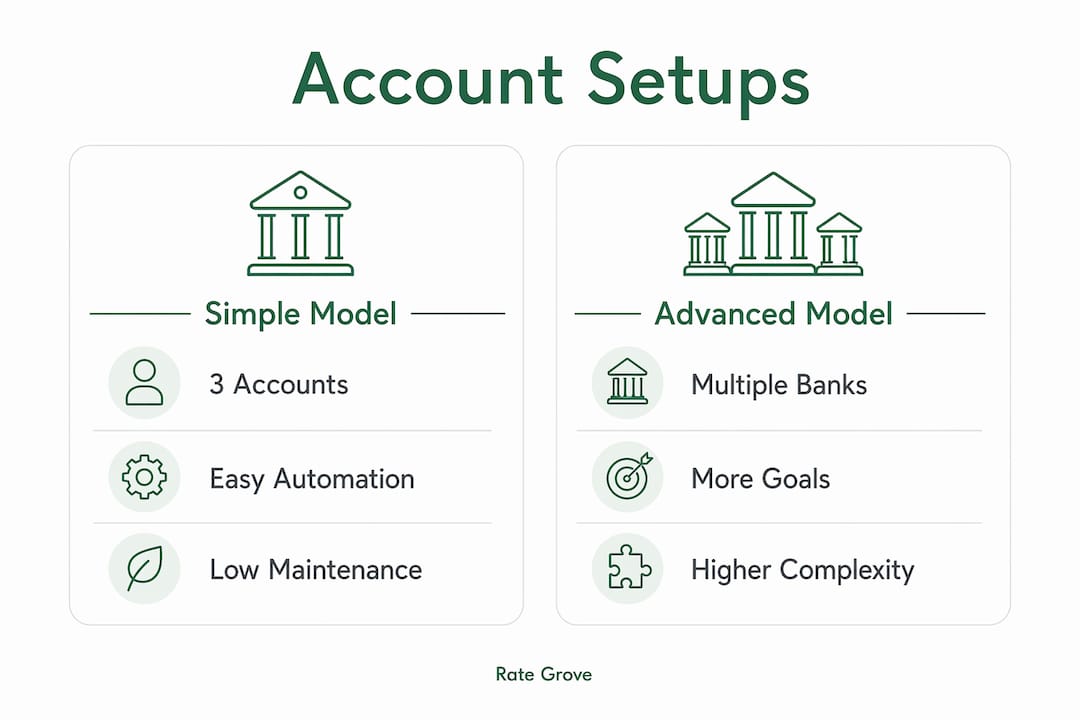
The 3-account model is the right starting point for most people. It is low-maintenance, easy to automate, and covers the two most important separations: spending money versus saved money. Add a fourth account when you have a concrete goal with a specific dollar target and timeline, such as a car purchase in 18 months. The fifth account makes sense when business or joint finances genuinely need their own lane, not just as an organizational preference.

One practical note: before opening accounts at a new institution, check whether your primary bank offers sub-accounts or savings “buckets.” Many modern banks include this feature, which delivers the same psychological separation without extra logins or transfer overhead. If your bank has it, start there.
How do you set up a multi-account system step by step?
The setup process is straightforward. Work through these steps in order, and you can have a functioning system by the end of the day.
-
Define the purpose of each account. Write it down before you open anything. “Emergency fund — 3 months of expenses,” “Bills and fixed costs,” “Discretionary spending.” Purpose-first thinking prevents you from opening accounts you do not need.
-
Name every account clearly. Most banks let you set a nickname in online banking. Use descriptive names like “Emergency Fund,” “Car Repair Fund,” or “Bills Only.” Vague names like “Savings 2” are a visibility trap waiting to happen.
-
Choose where to keep each account. Emergency funds belong in a high-yield savings account at an online bank or credit union where the APY is competitive. Sinking funds can sit in a second savings account at the same institution. Your primary checking stays at whichever bank handles your direct deposit and bill pay.
-
Set up split direct deposit or a recurring transfer. Split direct deposit lets you route a fixed dollar amount or percentage of each paycheck directly to savings before it ever lands in checking. If your employer does not support splits, set a recurring ACH transfer from checking to savings on the same day your paycheck posts.
-
Configure bill pay routing. If you have a dedicated bills checking account, update your utility, subscription, and loan autopay accounts to draw from that account. This is a one-time task that pays off every month.
-
Seed each account with a starter balance. Aim for at least one month of that account’s expected outflow. For a bills account, that means one month of fixed expenses. For an emergency fund, start with whatever you can and build from there.
-
Set a calendar reminder to review in 30 days. The first month reveals whether your transfer amounts are calibrated correctly.
Pro Tip: Move money to savings on payday, not at the end of the month. When savings transfer happens automatically on day one, you spend what remains rather than saving what is left over. That single habit change is what separates people who build savings from those who intend to.
Transfer schedule template:
- Per-paycheck (biweekly): Transfer a fixed dollar amount to emergency savings and sinking funds on the same day as each paycheck.
- Monthly (for irregular income): Set transfers for the 1st of the month after your typical income receipt window. Keep a buffer for variable income in checking before routing to savings.
Naming convention examples: “Emergency Fund,” “Holiday 2026,” “Car Repair,” “Bills Only,” “Free Spending.” Short, specific, and unambiguous.
How do you keep a clear picture across all your accounts?
The biggest risk with multiple accounts is losing the consolidated view. You can have a perfectly organized system and still miss an overdraft because you forgot one account had a low balance.

Three approaches work well, depending on how hands-on you want to be:
Budgeting and aggregation apps connect to all your accounts and display balances in one dashboard. Apps like Monarch Money, YNAB (You Need a Budget), and Copilot pull live data from linked institutions, so you see your total cash position without logging into each bank separately.
Bank-native dashboards work if all your accounts are at one institution or a small number of institutions that offer aggregation. Some banks let you link external accounts for a consolidated view inside their own app.
A master spreadsheet is the most flexible option and requires no third-party access to your accounts. Here is a simple structure:
| Column | What to track |
|---|---|
| Account name | Nickname you set in the bank app |
| Institution | Bank or credit union name |
| Current balance | Updated weekly or after each paycheck |
| Upcoming outflows | Bills, transfers, or purchases due this week |
| Net available | Current balance minus upcoming outflows |
| Notes | Anything unusual (pending transfer, fee due) |
Update this weekly, ideally on the same day you do your checking-to-savings review. A 10-minute weekly check catches problems before they become overdrafts.
Monthly reconciliation checklist: Confirm all scheduled transfers executed, verify no unexpected fees posted, check that each account’s balance aligns with its purpose, and adjust transfer amounts if income or expenses changed.
What are the real drawbacks and how do you avoid them?
Multiple accounts create real risks if you are not deliberate about managing them. Here are the most common failure modes and their fixes:
- Visibility trap. Separate accounts can hide your total cash position. You might feel flush in your spending account while your bills account is nearly empty. Fix: use a consolidated tracking tool or the master spreadsheet above, and review it weekly without exception.
- Fee accumulation. Monthly maintenance fees across three or four accounts add up fast. Fix: choose no-fee online banks or credit unions, and read the fee schedule before opening any account. Many online banks charge zero monthly fees with no minimum balance requirement.
- Minimum balance violations. Some accounts charge fees or lose their high-yield rate if your balance drops below a threshold. Fix: know the minimum for each account and set a low-balance alert in the bank’s app.
- Dormancy and account closure. Banks can close accounts that show no activity for an extended period, and some charge dormancy fees before that. Fix: set at least one small recurring transaction per year on each account, even a $1 auto-transfer, to keep it active.
- Over-extension. More accounts do not automatically mean better finances. If you are spending more than 15 minutes a week just managing account logistics, you have too many. Fix: consolidate goal accounts that have similar timelines, or use sub-buckets within one savings account instead of separate accounts.
What are the FDIC rules you need to know?
The FDIC insures deposits up to its official coverage limit per depositor, per insured bank, per ownership category. That is the number that matters.
In plain terms: if you have $250,000 at Bank A and $250,000 at Bank B, both amounts are fully insured because they are at separate institutions. If you have $300,000 at a single bank in a single account type, $50,000 of that sits above the coverage limit.
Ownership categories matter too. An individual account and a joint account at the same bank are counted separately, which means a couple can hold significantly more than $250,000 at one institution and still be fully covered. Trust accounts add another layer of coverage per named beneficiary.
Practical rules of thumb:
- Keep your emergency fund at an FDIC-insured institution and confirm the bank’s insured status on the FDIC’s BankFind tool before depositing.
- If your total savings at one bank approaches $250,000, spread the excess to a second insured institution.
- For large balances, spreading across multiple banks is a straightforward way to increase total coverage and can also let you capture higher APYs at specialized online banks.
- Joint accounts and trust structures can extend coverage further; consult the FDIC’s coverage calculator for your specific situation.
How many accounts is too many?
Three accounts is the right starting point for most people. Four to six is a sensible upper range for someone with active goals or a side business. Beyond six, the maintenance overhead typically outweighs the organizational benefit.
Signs your system has gotten too complex:
- You regularly forget which account a bill draws from.
- You have two or more accounts with balances under $500 that are not actively growing toward a goal.
- Your emergency fund is split across so many accounts that you cannot quickly access a meaningful amount in a real emergency.
- You are paying fees on accounts you rarely use.
- Reconciling your accounts takes more than 20 minutes a week.
If any of these apply, consolidate. The goal is clarity, not complexity. Before opening a new account for a new goal, check whether your bank’s sub-account or bucket feature can do the same job. It usually can, and it saves you a login.
Key Takeaways
A multi-account banking strategy works best when it is built on automation, kept to a manageable number of accounts, and reviewed weekly so the consolidated picture stays clear.
| Point | Details |
|---|---|
| Start with three accounts | Checking, high-yield emergency savings, and one goal savings account covers most needs. |
| Automate on payday | Set split direct deposit or a recurring transfer so savings move before you can spend them. |
| FDIC coverage limit | $250,000 per depositor, per insured bank, per ownership category — spread balances across institutions if you exceed this. |
| Weekly visibility check | Review all account balances in one place weekly to catch overdrafts and misallocations early. |
| Rate Grove for rate comparison | Use Rate Grove to compare high-yield savings rates and fees before choosing where to park your emergency or goal funds. |
The case for keeping it boring on purpose
There is a version of multi-account banking that gets complicated fast: a different bank for every goal, a spreadsheet with 12 tabs, and a weekly ritual that feels like a part-time job. That version fails. Not because the structure is wrong, but because complexity is the enemy of consistency.
The most durable systems are almost boring. Three accounts. Two automated transfers. One weekly check-in. The people who stick with this approach for a year are not the ones who built the most elaborate setup. They are the ones who made the system invisible enough that it runs without willpower.
There is also a timing expectation worth setting honestly: you will not feel the benefit in week one. The first month is calibration. You will probably adjust your transfer amounts once or twice. By month two or three, the accounts start to feel natural, and by month six, the emergency fund has real weight to it. That timeline is normal. The setup takes 30 minutes; the payoff takes a season.
One more thing worth saying: the account structure is not the point. The point is that money moves toward your goals without you having to decide every time. Automation is the actual strategy. The accounts are just the containers.
Find the right accounts with Rate Grove
Once you know how many accounts you need and what each one is for, the next question is where to open them. That is where the rates, fees, and fine print actually matter, and where most people spend too much time on outdated information.
Rate Grove compares high-yield savings accounts, CDs, and checking accounts side by side using verified data pulled directly from issuer and regulator sites. Every guide is updated monthly, so the APYs and fee schedules you see reflect current offers, not last year’s numbers. You can filter by account type, check minimum balance requirements, and spot fee traps before you commit to opening anything.
If you are setting up your emergency fund or a goal savings account and want to make sure you are getting a competitive rate, compare savings rates at Rate Grove before you open. It takes less time than a bank branch visit and gives you a cleaner comparison than most bank websites will.
Useful sources
- FDIC Deposit Insurance FAQ — official coverage limits, ownership categories, and the BankFind tool for verifying insured status.
- CFPB: Choosing a Bank Account — plain-language guidance on account types, fees, and consumer rights.
- Alliant Credit Union: Split Direct Deposit Guide — step-by-step instructions for routing income across multiple accounts.
- U.S. Bank: Managing Multiple Bank Accounts — practical tips on consolidated tracking and avoiding the visibility trap.
- Ramsey Solutions: How to Budget Using Multiple Bank Accounts — envelope-style budgeting adapted for real bank accounts and sub-buckets.
- Investopedia: Is It OK to Have More Than One Bank Account? — covers soft switching, dormancy risks, and insurance strategy.