

Your credit card’s statement closing date is the last day of your billing cycle. On that day, your issuer locks in your balance, generates your statement, and reports that balance to the credit bureaus. Everything that follows — your minimum payment, your grace period, and the utilization figure on your credit report — flows from that single date. According to American Express, the payment due date typically falls a few weeks after the closing date, giving you a window to pay before interest kicks in.
Key Takeaways
The statement closing date is the single most useful timing lever you have for managing interest, credit utilization, and payment planning on any U.S. credit card.
| Point | Details |
|---|---|
| Closing date definition | The last day of your billing cycle; your issuer locks your balance and generates your statement on this date. |
| Grace period window | The due date typically falls 21–25 days after the closing date; pay the full balance by then to avoid interest. |
| Credit utilization timing | Issuers report the closing-date balance to credit bureaus; pay before closing to lower your reported utilization. |
| When interest starts | Interest accrues daily on any balance carried past the due date; carrying a prior balance removes the grace period for new purchases. |
| How to find your date | Check your statement, issuer app, or call customer service; the closing date usually falls on the same day each month. |
Table of Contents
- What is the statement closing date, and how does it differ from the due date?
- How does the closing date affect interest and your grace period?
- How does the closing-date balance affect your credit report?
- What happens to charges made on the closing date?
- Should you pay before the closing date or by the due date?
- How do you find your statement closing date?
- A simple checklist to run before your closing date
- A note from Rate Grove
- Sources
What is the statement closing date, and how does it differ from the due date?
These two dates do different jobs, and mixing them up is one of the most common billing mistakes cardholders make.
The statement closing date (also called the billing cycle end date) is when your issuer stops adding new charges to the current statement, calculates your balance, and posts your bill. The payment due date is the deadline to pay at least the minimum — or the full balance — to avoid a late fee or interest charges.
Credit One Bank notes that the closing date is typically 21–25 days before the due date. That gap is your grace period.
Here is a concrete example:
- Closing date: March 15 — your issuer locks your $1,200 balance and generates the statement.
- Statement available: March 16–17 — you can view it in your app or online account.
- Payment due date: April 5 — you have until this date to pay in full and avoid interest.
| Event | Closing date | Payment due date |
|---|---|---|
| What happens | Issuer locks balance, posts statement | Payment deadline; late fees apply if missed |
| Interest calculated | Yes, on any carried balance | Interest begins accruing if balance is unpaid |
| Minimum payment set | Yes | Must be paid by this date |
| Charges added to cycle | Last day for this cycle | No new charges assigned here |
Pro Tip: Set a calendar reminder for both dates. Missing the due date costs you a late fee; ignoring the closing date costs you control over your reported balance.
How does the closing date affect interest and your grace period?
The short answer: pay your full statement balance by the due date, and you pay zero interest on purchases. Carry any balance past the due date, and interest accrues daily until the balance is cleared.
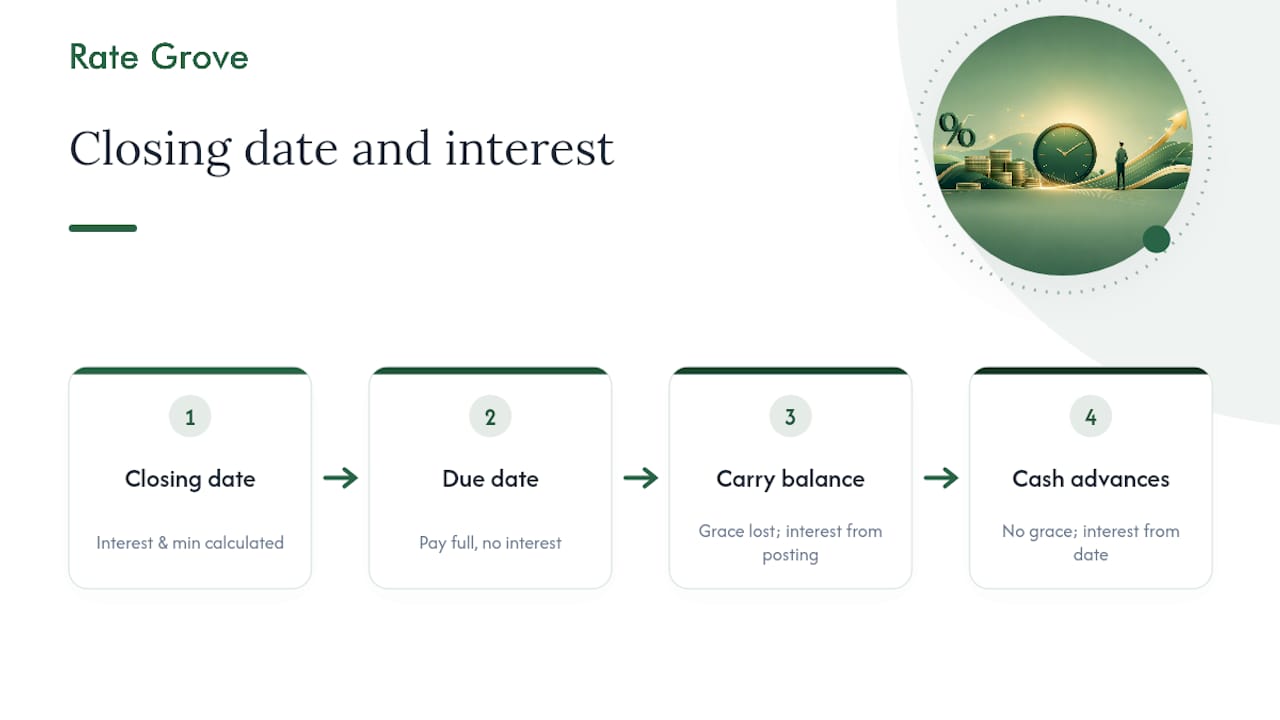
Discover explains that the issuer calculates interest and your minimum payment at the close of the billing cycle, not on the due date. So the closing date is really where the math starts.
Three common scenarios:
Pay the full statement balance by the due date. No interest on purchases. Your grace period stays intact for the next cycle. This is the cleanest outcome.
Carry a balance from a prior cycle. Your grace period disappears. New purchases start accruing interest from the day they post, not from the due date. This catches a lot of cardholders off guard.
Cash advances or certain balance transfers. These typically have no grace period at all. Interest starts on the transaction date regardless of when you pay. Check your card agreement for the exact terms, since rules vary by issuer. For a deeper look at how daily interest compounds, Rate Grove’s guide on how credit card interest works walks through the math.
Pro Tip: Even if you make new purchases after the closing date, always pay the previous statement balance in full by the due date. That one habit keeps your grace period alive and prevents interest from creeping onto new charges.
How does the closing-date balance affect your credit report?
Issuers commonly report your balance as of the statement closing date to one or more of the three major credit bureaus — Equifax, Experian, and TransUnion. That reported balance is what the bureaus use to calculate your credit utilization, which makes up a significant portion of your credit score.
Here is how it plays out in practice:
- You have a $6,000 credit limit.
- Your closing-date balance is $1,200.
- Your reported utilization is 20% ($1,200 ÷ $6,000).
Pay after the closing date but before the due date, and the bureau still sees the $1,200 figure from the statement.
Because issuers may report to different bureaus on different schedules, a targeted payment before the closing date is the most reliable way to ensure the lower balance appears on your next credit report. Rate Grove’s guide on credit score impact on credit applications covers how reported utilization affects loan approvals in more detail.
Pro Tip: If you are applying for a mortgage or auto loan in the next 30–60 days, pay your balances down before the closing date — not just by the due date. Lenders pull the bureau-reported figure, which reflects your closing-date balance.
What happens to charges made on the closing date?
A charge made on the closing date may or may not appear on that statement. It depends on whether the transaction posts before your issuer generates the statement, not just whether it was authorized.
Here is the key distinction:
- Authorization happens at the moment of purchase — your card is approved and the funds are held.
- Posting happens when the merchant finalizes the transaction, which can take 1–3 business days.
If you swipe your card at 11:45 PM on the closing date, the authorization goes through, but the charge may not post until the next business day. That means it lands on your next billing cycle, not the current statement.
A few practical points:
- Issuers generate statements at different times of day, and most do not publish an exact cutoff hour.
- Time zone differences matter. A purchase made at 10 PM Pacific time may process after midnight Eastern time.
- The safest assumption: treat the closing date as a soft deadline. If you need a charge to appear on the current statement, make it a few days early.
Does the closing date include that day? Technically yes, but posting delays mean a same-day charge is not guaranteed to land on the current statement. When in doubt, check your account the next morning to see which cycle the charge posted to.
Should you pay before the closing date or by the due date?
The right answer depends on your goal. Here is a simple decision framework:
-
Goal: Lower your reported credit utilization. Pay before the closing date. The balance your issuer reports to the bureaus is locked in on that day, so paying early is the only way to reduce the number that shows up on your credit report.
-
Goal: Avoid interest charges. Pay the full statement balance by the due date. You do not need to pay before the closing date to preserve your grace period — paying in full by the due date is enough.
-
Goal: Manage cash flow while avoiding a late fee. Pay at least the minimum by the due date. You will carry a balance and owe interest, but you avoid the late fee. Then pay the remainder as soon as possible to stop daily interest from growing.
-
Goal: Prepare for a loan application. Pay down balances before the closing date, ideally to under 10% utilization per card. Lenders see your bureau-reported balance, not your real-time balance.
Pro Tip: Split your payment into two parts: one before the closing date to control the reported balance, and one by the due date to clear the remainder. Most issuers let you schedule multiple payments through their app, so you can set this up once and let it run automatically.
How do you find your statement closing date?
Chase notes that the closing date generally falls on the same calendar day each month, even if that day is a weekend or holiday. That consistency makes it easy to plan once you know the date.

Here is where to look:
On your paper or PDF statement: The closing date appears near the top, usually labeled “Statement closing date,” “Billing period end,” or “Cycle end date.”
In your issuer’s app or online account: Log in and look under “Account summary,” “Billing cycle,” or “Statements.” Search for labels like “Next closing date” or “Statement closing date.” Most major issuers display the current cycle’s closing date on the main account dashboard.
By calling customer service: Ask the representative for your current billing cycle dates and confirm whether your issuer allows you to request a different closing date. Some do, which can be useful for aligning your billing cycle with your paycheck schedule.
If anything is unclear, your card agreement (the document mailed when you opened the account, also available in your online account) lists the billing cycle terms. When in doubt, contact your issuer directly to confirm.
A simple checklist to run before your closing date
Follow these steps during the final week of your billing cycle to stay in control.
7 days before closing:
- Log into your account and review all pending and posted charges for accuracy.
- Note your current balance and calculate your utilization against your credit limit.
- Identify any disputed charges and contact your issuer to resolve them before the statement closes.
2 days before closing:
- Make a targeted payment if your balance is higher than your utilization goal. For example, if your limit is $5,000 and you want to report under 10%, pay your balance down to below $500.
- Confirm the payment has posted — not just scheduled — by checking your account.
1 day before closing:
- Verify that any recent large purchases have posted to the correct cycle.
- If you called your issuer to dispute a charge or request a date change, confirm the outcome is reflected in your account.
A quick script if you need to call your issuer: “I’d like to confirm my current billing cycle closing date and check whether any pending charges are expected to post before it closes.” That one question gets you the two pieces of information you need.
A note from Rate Grove
Rate Grove recommends treating your statement closing date as a timing tool, not just a calendar marker. This guide is written specifically for U.S. cardholders and is fact-checked against issuer explainers from American Express, Chase, Discover, and Credit One Bank, as well as consumer guidance from the Consumer Financial Protection Bureau. Billing cycle rules can vary by issuer and card type, so always verify your specific dates and terms through your card agreement or by contacting your issuer directly.
Sources
The following U.S. sources back the guidance in this article and are worth bookmarking for your own reference:
- What Is a Credit Card Closing Date?
- Credit Card Payment Due Date vs Statement Closing Date | Credit One Bank
- Statement date vs. due date | Discover
- When Is Interest Charged on a Credit Card? | Chase
This article is general information, not a substitute for advice from a qualified financial advisor. Consult a qualified financial professional about your own circumstances before acting on anything here.