

The best banks with savings buckets right now are Ally Bank, SoFi, Wealthfront, ONE, and Capital One 360 — each lets you label and separate money by goal inside a single account. Every option below is FDIC-insured (or NCUA-insured for credit unions). APYs shift frequently, so verify the current rate directly on the issuer’s site before you open an account.
Quick picks by who you are:
- Ally Bank (Ally Savings Account) — Up to 30 named buckets plus Round Ups and Surprise Savings automation; best for savers who want maximum bucket count and hands-off automation
- SoFi (Checking & Savings / Vaults) — Named Vaults inside one account with a competitive APY; best for people who want checking and savings in one place
- Wealthfront Cash Account — Unlimited savings categories with a strong APY; best for high-yield seekers who also invest
- ONE (ONE Account) — Labeled “Pockets” inside a unified balance; best for people who want a simple, modern app with bucket-style organization
- Capital One 360 Performance Savings — Multiple linked savings accounts simulate buckets; best for those who prefer a large national brand
- Betterment Cash Reserve — Goal tracking with high APY, integrated with Betterment’s investment platform; best for investors who want cash management alongside their portfolio
Full comparison table is in the next section. The short version: if automation matters most, Ally wins. If APY is the priority, Wealthfront and Betterment are worth a close look.
Key Takeaways
The most important decision when choosing a bucket-enabled savings account is matching automation depth and bucket count to your goals, not chasing the highest APY alone.
| Point | Details |
|---|---|
| Ally leads on bucket count | Ally supports up to 30 named buckets with Round Ups and Surprise Savings automation built in. |
| APY changes frequently | Always verify the current rate on the issuer’s site; promotional rates may not be ongoing. |
| Buckets share one FDIC limit | All buckets inside one account share a single $250,000 FDIC or NCUA insurance limit. |
| Automation beats willpower | Scheduled transfers and round-ups consistently outperform manual saving for hitting short-term goals. |
| Rate Grove for quick comparison | Rate Grove’s monthly-verified comparison tool shows APYs, fees, and bucket features side by side. |
Table of Contents
- How do savings buckets actually work inside a bank account?
- Which banks and fintechs offer built-in savings buckets?
- How do you choose the right bucket-enabled account for your goals?
- How to set up savings buckets in a typical banking app
- Common savings bucket ideas and how to size them
- What if your bank does not offer savings buckets?
- How Rate Grove verifies savings bucket data
- Tax implications of interest earned in savings buckets
- My honest take on picking a bucket-enabled account
- Rate Grove makes comparing bucket accounts faster
- Sources
How do savings buckets actually work inside a bank account?
A savings bucket (also called a vault, pocket, or subaccount) is a labeled section of your savings balance that you set aside for a specific goal. The money never leaves your account — it stays in one place, earns the same APY, and is still covered under one FDIC or NCUA insurance limit. The difference from a traditional savings account is purely organizational: instead of one undivided pile of cash, you see named slices (“Emergency Fund,” “Vacation,” “Car Repair”) with individual balances and progress bars.
That is the key distinction from opening multiple separate savings accounts. With separate accounts, each one has its own login, statement, and sometimes its own minimum balance requirement. Buckets keep everything consolidated while still giving you the mental clarity of labeled goals.
Typical features you will find in bucket-enabled accounts:
- Named goal labels you set yourself
- Target amount and target date fields
- Visual progress bars or percentage-to-goal indicators
- Internal transfers between buckets that happen instantly (no ACH delay)
- Round-Up automation (spare change from debit purchases rounds up into a bucket)
- Surprise Savings or auto-transfer rules that move small amounts on a schedule
- Interest compounding on the full account balance, not per bucket
One thing worth knowing: when you move money between buckets, you are not actually moving funds between accounts. It is a bookkeeping split. That means no transfer limits apply to internal bucket moves, and no ACH processing time. External transfers (from a linked checking account at another bank) still follow standard ACH timelines, typically one to three business days.
Pro Tip: Lock your emergency fund bucket by setting it as the last bucket you would ever touch. In Ally, you can name it something deliberate like “DO NOT TOUCH — Emergency” and pair it with a Surprise Savings booster so it grows automatically without any manual effort. Ally’s Surprise Savings feature analyzes your linked checking account and moves small, safe amounts up to three times per week.
Which banks and fintechs offer built-in savings buckets?
APYs below were verified against issuer sites in 2026 but change frequently. Always compare current savings rates and check the issuer’s page directly before opening an account. Promotional APYs may apply; confirm whether a rate is introductory or ongoing before committing.
Quick takeaways from the comparison:
- Best bucket count: Ally (up to 30) leads by a wide margin for people managing many simultaneous goals
- Best automation: Ally’s Surprise Savings and Round Ups are the most documented automation tools in this category
- Best APY options: Wealthfront and Betterment consistently rank among the highest-yield options; verify current rates before deciding
- Best for branch access: Bank of America, Chase, and Wells Fargo win on physical presence but offer fewer native bucket features
- Best for simplicity: NBKC and ONE offer clean, modern apps without overwhelming feature sets
Traditional banks like Chase, Wells Fargo, Bank of America, Huntington, and Regions do not offer true in-app buckets. You can simulate the effect by opening multiple savings accounts, but that requires more manual management.
How do you choose the right bucket-enabled account for your goals?
The four criteria that matter most: APY, automation depth, bucket count, and FDIC/NCUA coverage. Most people overweight APY and underweight automation. If a 0.10% APY difference saves you $12 a year but poor automation means you skip contributions three months in a row, you have made the wrong trade.
Concrete criteria to compare:
- APY stability: Is the rate a promotional intro rate or an ongoing rate? Check the savings rate comparison factors that affect your real return, including compounding frequency
- Bucket count: Do you need 3 buckets or 15? Ally supports up to 30; most others cap at fewer
- Automation: Round Ups, Surprise Savings, and scheduled transfers reduce the willpower required to save consistently
- Fees and minimums: Online banks and fintechs typically charge no monthly fee; traditional banks often do unless you meet balance or direct-deposit thresholds. Check the savings account fee checklist before committing
- FDIC/NCUA coverage: All buckets inside one account share one $250,000 FDIC limit. If your total savings exceeds that, you need accounts at multiple institutions
- App UX: If the bucket setup is buried three menus deep, you will use it less. Test the app before committing
- Transfer limits: Federal Regulation D limits were suspended in 2020, but some banks still cap outbound transfers. Confirm the policy
Decision flow:
- Want maximum automation with many goals? → Ally Bank
- Want high APY and unlimited categories? → Wealthfront or Betterment
- Want checking and savings unified? → SoFi or ONE
- Want a large national bank with branch access? → Capital One 360 or Bank of America (with separate accounts)
- Saving for one or two specific named goals with visual tracking? → Sallie Mae SmartyPig
Red flags to watch for:
- Bucket settings hidden in account settings rather than the home screen
- Transfer fees between internal buckets (should always be free)
- Unclear or missing FDIC/NCUA disclosures on the app or website
- APY listed without a “as of” date (a sign the rate may be stale)
How to set up savings buckets in a typical banking app
Most bucket-enabled apps take five taps or fewer to create your first bucket. The general flow is nearly identical across Ally, SoFi, and ONE, with minor label differences.
- Open your savings account in the app and navigate to the savings or goals section (labeled “Buckets,” “Vaults,” or “Pockets” depending on the bank)
- Tap “Create new bucket” (or the equivalent “+” button)
- Name the bucket — use a specific label like “Europe Trip 2027” rather than “Vacation” so the goal feels concrete
- Set a target amount and target date — the app will calculate how much you need to save per month
- Set up an automatic transfer from your linked checking account — weekly or monthly, whatever matches your pay schedule
- Enable Round Ups or Surprise Savings if the bank offers them, for passive top-ups between scheduled transfers
- Monitor progress from the home screen; most apps show a progress bar per bucket
Mini example 1 — Emergency fund: Open Ally, create a bucket named “Emergency Fund,” set a $9,000 target, enable Surprise Savings. Ally’s booster analyzes your linked checking and moves small amounts automatically, up to three times per week, without you doing anything after setup.
Mini example 2 — Vacation fund: Create a bucket named “Italy 2027,” set a $2,400 target with a 12-month deadline. The app suggests $200/month. Set a recurring transfer of $200 on the first of each month from checking. Add Round Ups for extra contributions from everyday spending.
Pro Tip: Use a consistent naming convention across all your buckets: “GOAL — Timeline” (e.g., “Car Repair — Ongoing,” “Holiday Gifts — Dec 2026”). Consistent labels make it easier to scan your savings at a glance and prioritize contributions when money is tight. For automated funding strategies that link your checking account to multiple buckets, a clear naming system prevents confusion when transfers post.
Common savings bucket ideas and how to size them
You do not need to invent your bucket categories from scratch. These are the most practical ones, sized with simple rules of thumb.
Ready-to-use bucket labels and sizing guidance:
- Emergency Fund — 3–6 months of essential expenses; fund first before any other bucket. See emergency fund best practices for sizing guidance by income type
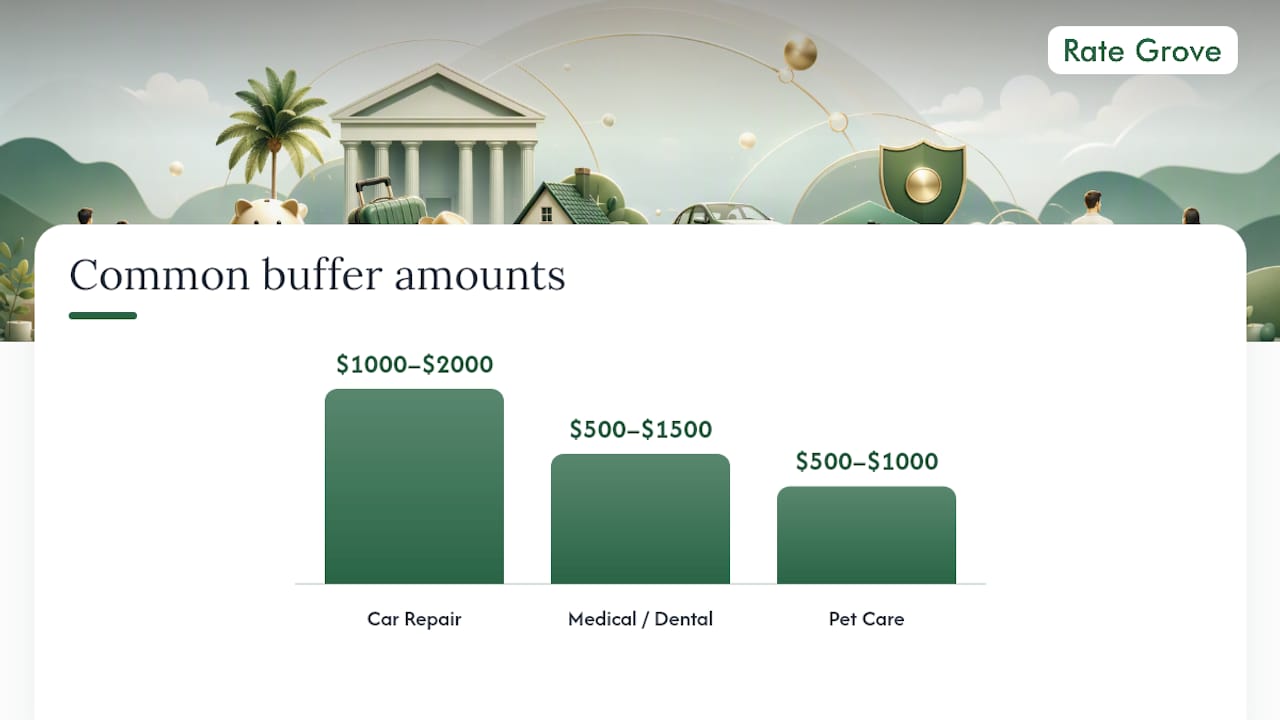
- Car Repair / Maintenance — $1,000–$2,000 as a standing buffer; replenish after each use
- Travel / Vacation — Time-based: divide total trip cost by months until departure
- Holiday Gifts — Divide your annual gift budget by 12 and contribute monthly year-round
- Medical / Dental — $500–$1,500 depending on your deductible and health plan
- Home Repair — 1% of home value per year is a common rule of thumb for homeowners
- Taxes (self-employed) — Set aside 25–30% of each freelance payment immediately into this bucket
- Irregular Income Buffer — One month of expenses held as a smoothing reserve; especially useful for freelancers and gig workers. The high-yield savings for irregular income guide covers allocation strategies in detail
- New Tech / Electronics — Small monthly contribution toward planned purchases
- Education / Courses — Annual budget divided by 12
- Pet Care — $500–$1,000 as a standing buffer for vet bills
- Sinking Fund (general) — A catch-all for irregular expenses that do not fit a named bucket
Two quick math examples:
Funding a $1,200 vacation in 6 months: $1,200 ÷ 6 = $200/month. Set a $200 auto-transfer on payday. Add Round Ups for a small buffer against price increases.
Irregular income allocation: If you earn $4,000 one month and $1,500 the next, deposit everything into a central account, then distribute: 50% to living expenses, 25–30% to taxes bucket, 10% to emergency fund, remainder split across other goals.
| Bucket | Sizing Rule | Funding Method |
|---|---|---|
| Emergency Fund | 3–6 months of expenses | Auto-transfer; highest priority |
| Car Repair | $1,000–$2,000 buffer | Monthly contribution; replenish after use |
| Travel | Trip cost ÷ months to departure | Monthly auto-transfer |
| Holiday Gifts | Annual budget ÷ 12 | Monthly contribution, year-round |
| Taxes (freelance) | 25–30% of each payment | Transfer immediately on receipt |
| Home Repair | ~1% of home value per year | Monthly contribution |
What if your bank does not offer savings buckets?
Four practical alternatives exist if your current bank lacks native bucket features.
- Multiple savings accounts at the same bank: Capital One, Chase, and most large banks let you open several savings accounts and label each one. You get goal separation but manage separate balances and statements. Interest still compounds on each account individually, and each account counts toward the same FDIC limit at that institution.
- Multiple savings accounts at different banks: Spreads FDIC coverage across institutions (useful if your total savings exceeds $250,000) but adds login complexity and ACH transfer delays between banks.
- Third-party budgeting apps (YNAB, Copilot, Monarch Money): These apps overlay a virtual bucket system on top of your existing accounts. You assign dollars to categories without moving money. The tradeoff: the app does not hold your money, so interest still accrues in your bank account normally, but the categorization lives only in the app. If the app closes or you cancel your subscription, your tracking history may not be portable.
- Manual tracking (spreadsheet or notes app): Free, fully flexible, and works with any bank. The downside is that it requires discipline to update after every transaction, and there is no automation.
A note on security and coverage when using third-party apps: Apps like YNAB connect via read-only bank feeds (through Plaid or similar aggregators). They do not hold your deposits, so your FDIC/NCUA coverage is unaffected. However, you are sharing bank credentials or read-only tokens with a third party. Use apps that support OAuth-based connections rather than credential sharing, and enable two-factor authentication on your bank account regardless of which method you choose.
How Rate Grove verifies savings bucket data
Rate Grove checks each provider’s issuer page, app feature list, and regulatory filings before publishing any comparison. Here is the specific process:
- APY verification: Pulled directly from each bank or fintech’s official savings account page. APYs are noted with a check date because rates change without notice. Promotional rates are flagged separately from ongoing rates. For a full explanation of how APY reporting and compounding frequency affect your real return, see Rate Grove’s savings rate comparison guide
- Bucket counts: Verified against issuer support pages and app documentation. Ally’s official support materials confirm the 30-bucket limit; other providers’ limits are sourced from their own published documentation
- Automation features: Confirmed via issuer feature pages. Ally’s Boosters documentation details Surprise Savings transfer frequency and Round Ups behavior
- Fees and minimums: Pulled from each bank’s fee schedule or account disclosure page
- FDIC/NCUA status: Cross-referenced with the FDIC BankFind database and NCUA’s credit union locator. Issuer registration details are also verified through NMLS Consumer Access and additional NMLS records where applicable
- Update cadence: Rate Grove refreshes comparison data monthly. If you are reading this more than 30 days after publication, verify APYs and feature details directly on the issuer’s site before making a decision
Tax implications of interest earned in savings buckets
Interest earned inside savings buckets is taxable income in the United States, regardless of how the money is labeled or organized. The IRS treats all interest from savings accounts the same way: it is ordinary income, reported on your federal tax return.
Your bank will send a Form 1099-INT at the end of the tax year if you earned $10 or more in interest. That form covers your total interest across all buckets in the account, not per bucket. You report the total on Schedule B (Form 1040) if your total interest income exceeds $1,500, or directly on Form 1040 if it is below that threshold.
A few practical points worth knowing:
- Buckets do not create separate tax accounts. One account, one 1099-INT.
- If you use multiple savings accounts at different banks to simulate buckets, each bank issues its own 1099-INT.
- High-APY accounts at fintechs like Wealthfront and Betterment that hold deposits at partner banks still issue a 1099-INT through the fintech or the partner bank. Confirm which entity issues the form when you open the account.
- Interest earned in a savings account is not tax-deferred. If you want tax-advantaged savings, that requires a different account type (IRA, HSA, 529), not a savings bucket.
This is general information, not tax advice. Confirm your specific reporting obligations with a qualified tax professional or the IRS directly at irs.gov.
My honest take on picking a bucket-enabled account
The automation gap between online banks and traditional banks is larger than most people expect. When you sit down with Ally or SoFi versus a Chase or Wells Fargo savings account, the difference is not just cosmetic. Ally’s Surprise Savings feature does something genuinely useful: it removes the decision entirely. You do not have to remember to transfer money. You do not have to calculate how much is “safe” to move. The algorithm does a conservative read of your checking balance and moves small amounts automatically. For most people, that behavioral nudge is worth more than a marginally higher APY at a bank with a clunkier interface.
My personal rule when juggling more than four goals: prioritize the account with the highest bucket count and the cleanest automation, then accept whatever APY that account offers, as long as it is within 0.25–0.50 percentage points of the top rate available. The compounding difference on a $5,000 balance at that spread is small enough that consistent contributions matter far more than squeezing out the last basis point.
The one thing I would push back on in most bucket-account comparisons: they treat APY as the headline metric and bury automation in a footnote. For anyone managing more than two or three goals simultaneously, the reverse framing is more honest.
Rate Grove makes comparing bucket accounts faster
Sorting through 14 savings accounts to find the right bucket setup takes time, and APYs change every few weeks. Rate Grove’s side-by-side comparison tool pulls verified APYs, fee schedules, and bucket feature details into one view so you can filter by what matters to you, whether that is automation depth, bucket count, or minimum balance.
Every guide on Rate Grove is updated monthly against issuer pages and regulatory records, so you are not comparing rates that expired two quarters ago. If you want to see current APYs and bucket features side by side without clicking through a dozen bank websites, start your comparison at Rate Grove and filter by the features that fit your goals.
Sources
Use these links to check current APYs, bucket limits, and insurance status directly:
- What are Ally Bank’s Savings Buckets and Boosters? | Ally
- Savings Buckets: Alternative to Multiple Accounts? | Ally
- Nmlsconsumeraccess
- Nmlsconsumeraccess
This article is general information, not a substitute for advice from a qualified financial advisor. Consult a qualified financial professional about your own circumstances before acting on anything here.